FutureShop stocks a curated range of digital audio cables from leading specialist brands including AudioQuest, Chord Company, Tellurium Q, Nordost, Atlas, and Shunyata. Our team has hands-on experience with each cable type covered in this guide.
Our Verdict
For most hi-fi systems, coaxial S/PDIF or USB will serve well, but if your DAC supports HDMI I2S, it is worth using: the jitter reduction is audible. For home theatres, HDMI remains the only practical choice for multi-channel audio. For professional or studio use, AES/EBU via XLR is the most robust and reliable option available.
Quick Take
- Coaxial S/PDIF supports up to 24-bit/192 kHz and is more reliable over longer runs than optical; optical maxes out at 96 kHz on many implementations but is immune to electrical interference.
- AES/EBU uses balanced XLR connections to support up to 24-bit/192 kHz with significantly better noise rejection than S/PDIF, making it the preferred choice in professional environments.
- HDMI I2S separates audio and clock signals for extremely low jitter, making it the highest-quality digital connection available for compatible audiophile DACs, though cross-brand compatibility is not guaranteed.
- USB supports up to 32-bit/768 kHz and DSD, and is the standard connection for computer-based audio; performance depends heavily on the quality of the USB cable and the DAC's clocking mode.
- Ethernet-based audio (Dante, AES67, AVB) is growing in high-end and professional systems and can carry audio over long distances without degradation.
- Your setup determines the best choice: no single connection type is universally superior across all use cases.
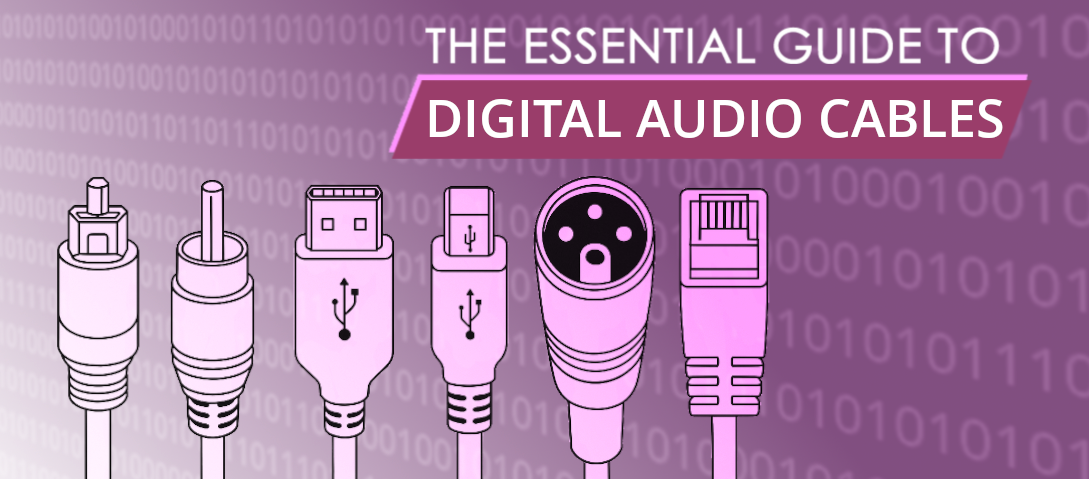
Understanding Digital Audio Interconnects: Types, Capabilities, and Applications
We discussed DACs in a recent product review. So, if you use a good DAC in your system, you will want a flawless stream of 0s and 1s reaching it from whichever digital platform has been streaming your hard-earned money each month. Unlike the simplicity of hi-fi's analogue antiquities, digital interconnects come in varying forms. Today, we will break these down for you.
If you would like more context on why the DAC at the end of this chain matters so much, our Ferrum Audio WANDLA and HYPSOS review explores what a high-end DAC can do with a clean digital signal.
Bits and Pieces: What Are Sample Rate and Bit Depth in Digital Audio
Determining digital audio quality involves the sample rate and bit depth. So, what are these?
What is Sample Rate
Sample rate is simple, this is the 'snippets' per second of audio information; the more snippets, the higher the resolution or the smoother the audio sounds.
What is Bit Depth
Bit depth is a harder concept, this is the depth of the information each sample can hold; the more bits, the more details are captured in each sample.
1. S/PDIF (Sony/Philips Digital Interface Format)
S/PDIF is a widely used digital audio interface that comes in two physical forms: coaxial (RCA) and optical (TOSLINK), despite the S/PDIF acronym often being associated with the coaxial inputs. Both handle bit depths of up to 24-bit. Coaxial cables carry electrical signals over conductors while optical cables carry light signals over fibre optics.
Coaxial S/PDIF: Digital Audio Over RCA Cable
Browse digital coaxial cables at FutureShop.
- Capabilities: Supports uncompressed stereo PCM audio and compressed surround sound formats like Dolby Digital and DTS.
- Advantages:
- Uses a single 75-ohm RCA cable, making it simple and cost-effective.
- Generally more robust than optical cables over longer distances.
- Handles sample rates of up to 192 kHz - Disadvantages:
- Susceptible to electromagnetic interference (EMI) due to electrical transmission.
- Limited bandwidth restricts support for high-resolution multi-channel audio. - Applications: Used in high-fidelity audio setups, home theatre systems, and professional audio interfaces.
Optical S/PDIF (TOSLINK): Light-Based Audio Transmission
Browse optical audio cables at FutureShop.
- Capabilities: Like coaxial S/PDIF but uses fibre-optic transmission.
- Advantages:
- Immune to electromagnetic interference.
- Optical cables reduce ground loop noise issues. - Disadvantages:
- Fragile and sensitive to bending.
- Involves an additional signal conversion (light into electrical at the receiver end).
- Limited bandwidth prevents support for higher-resolution multi-channel audio beyond Dolby Digital and DTS.
- Handles a lower sample rate of up to 96 kHz than coax cables. - Applications: Commonly found in TVs, home audio systems, gaming consoles, soundbars, and professional audio equipment.
2. AES/EBU: Professional-Grade Digital Audio via XLR
AES/EBU is a professional-grade digital audio interface using balanced XLR connections. Balanced cables have three conductors (2 signal/1 ground). The magic happens because the positive and negative conductors carry the same audio signal, but one is inverted (180 degrees out of phase) for noise cancellation.
Browse AES/EBU cables at FutureShop.
- Capabilities: Supports uncompressed digital audio at up to 24-bit/192 kHz and multi-channel audio configurations.
- Advantages:
- Balanced transmission reduces noise and interference, especially over much longer distances.
- More robust and reliable than consumer-grade S/PDIF. - Disadvantages:
- Requires more expensive equipment and cables.
- Less common in consumer audio products. - Applications: Used in professional audio recording, broadcasting, and high-end studio environments.
3. HDMI: High-Definition Audio and Video Over One Cable
HDMI is a versatile interface that carries both high-definition video and multi-channel audio.
Browse HDMI cables at FutureShop. For a deeper look at HDMI specifications and what to look for when buying, our essential guide to HDMI cables covers the full picture.
- Capabilities: Supports high-resolution audio formats, including Dolby TrueHD, DTS-HD Master Audio, and object-based formats like Dolby Atmos and DTS:X.
- Advantages:
- High bandwidth allows uncompressed multi-channel audio transmission.
- Supports video and audio in a single cable, reducing clutter. - Disadvantages:
- HDMI cables can be bulky and expensive.
- Audio extraction for standalone DACs or amplifiers requires additional hardware.
- Not ideal for long cable runs without signal loss or reduced capabilities; long cable runs require AOC (active optical) HDMIs. - Applications: Used in home theatres, gaming consoles, Blu-ray players, and AV receivers.
HDMI I2S: High-End Audio Transport for Audiophiles
HDMI I2S is a way of transmitting digital audio using the I2S (Inter-IC Sound) protocol through HDMI cables. It's mainly used in high-end audio systems for better sound quality. Typically, I2S is an internal connection inside one unit, but is now used to connect two digital audio components.
- Capabilities: Supports high-resolution, uncompressed digital audio with extremely low jitter, making it ideal for audiophile-grade DACs.
- Advantages:
- Reduces clock jitter by separating audio and clock signals, leading to better sound quality.
- A direct, seamless data stream connection, with less DAC processing.
- Capable of transmitting multi-channel audio with very high resolution.
- Compatible with high-end digital-to-analogue converters (DACs) for improved performance. - Disadvantages:
- Not a standardised implementation, leading to compatibility issues between different manufacturers. Cross-brand connections should be avoided.
- Limited to specialised audio equipment, making it less common in consumer applications.
- Less reliable than AES/EBU or S/PDIF - Applications: Used in high-end audio systems where the purest possible digital audio transmission is required, particularly between digital sources (like CD transports and streamers) and DACs.
4. USB Audio: High-Resolution Digital Audio from Computers
USB is a common interface for digital audio, particularly in computer-based audio systems and DACs.
Browse USB audio cables at FutureShop.
- Capabilities: Supports high-resolution digital audio (up to 32-bit/768 kHz and DSD formats).
- Advantages:
- Can transmit both power and data, simplifying device connections.
- Low-latency asynchronous transmission ensures accurate clocking. The DAC controls the data flow using its own high-precision clock to process the data, reducing reliance on the often-unstable clock of the source device. NOTE: Asynchronous mode depends on the DAC and is not universal across all USB audio. Some DACs still use adaptive or synchronous USB audio modes. - Disadvantages:
- Susceptible to electrical noise from computers.
- Not ideal for long cable runs without signal degradation or loss. - Applications: Used in external DACs, audio interfaces, professional music production, and high-end audio playback.
5. Thunderbolt for Digital Audio: Fast, Low-Latency Pro Interface
Thunderbolt is a high-speed interface mainly found in professional audio applications developed by Intel and Apple.
- Capabilities: Supports ultra-low latency and high-bandwidth digital audio transmission.
- Advantages:
- Extremely fast and reliable, ideal for professional recording setups.
- Can daisy-chain multiple devices. - Disadvantages:
- Expensive and primarily available on high-end equipment.
- Limited compatibility with consumer-grade devices.
- Unreliable at longer lengths. - Applications: Used in professional recording studios, high-end DACs, and digital audio workstations (DAWs).
6. Ethernet (Audio over IP & Networked Audio)
Ethernet-based digital audio transmission is gaining popularity, particularly in high-end and professional audio environments.
Browse audiophile Ethernet cables at FutureShop. If you stream music over a network, our guide to Ethernet cables for hi-fi streaming goes into much greater depth on cable quality, switch isolation, and network audio best practice.
- Capabilities: Supports high-resolution multi-channel audio with minimal latency.
- Advantages:
- Can transmit audio over long distances without degradation.
- Reduces the number of physical connections required for complex setups. - Disadvantages:
- Requires network configuration knowledge.
- Requires correct network setup to avoid latency issues. - Applications: Used in HD BaseT, Dante, AES67, and AVB (Audio Video Bridging) protocols for live sound, studio recording, and whole-home audio distribution.
Which Digital Audio Connection Is Best? Ranked by Use Case
Between coaxial (S/PDIF) and optical (Toslink) digital cables, the best choice depends on the use case. Optical is immune to electrical noise and ground loops since it transmits data using light rather than an electrical signal, making it ideal for setups where interference is a concern. Coaxial typically supports higher bandwidth and can handle 24-bit/192 kHz audio more reliably, while some Toslink implementations max out at 96 kHz. Use HDMI, USB, or AES/EBU if high-resolution or multi-channel uncompressed audio is needed.
Which connection should one use for the best sound?
Here's a general ranking but, ultimately, your setup ultimately determines the best choice:
- HDMI I2S – Offers extremely low jitter and high-resolution support, ideal for audiophile-grade setups.
- USB / Thunderbolt – Provides high bit depth and sample rates, great for computer-based playback with a high-quality DAC.
- AES/EBU – Balanced transmission reduces noise, making it superior to S/PDIF in professional environments.
- Ethernet (Audio over IP) – Great for high-end setups and multi-room audio but depends on network quality.
- HDMI (Standard) – Supports high-resolution multi-channel formats but requires additional hardware for audio extraction.
- Coaxial S/PDIF – Better than optical for longer runs and slightly lower jitter.
- Optical S/PDIF – Immune to electrical interference but limited in bandwidth and more susceptible to jitter.
To summarise, HDMI I2S or USB (with a well-isolated DAC) is ideal. For professional environments, AES/EBU or Thunderbolt is preferred. For home theatres, HDMI is best for multi-channel audio. S/PDIF is the choice for most home audio or hi-fi applications.
Conclusion: Choosing the Right Digital Audio Cable for Your System
Different digital audio interconnects serve various applications, from simple consumer setups to high-end professional audio systems. S/PDIF and HDMI are common in-home entertainment, while AES/EBU, USB, and Thunderbolt dominate professional environments. Ethernet-based solutions are emerging as the future of networked audio, offering scalability and flexibility. HDMI I2S is a niche but high-performance option favoured by audiophiles for its superior jitter control. Understanding these interconnects helps when selecting the right interface for your audio needs, ensuring optimal sound quality and performance.
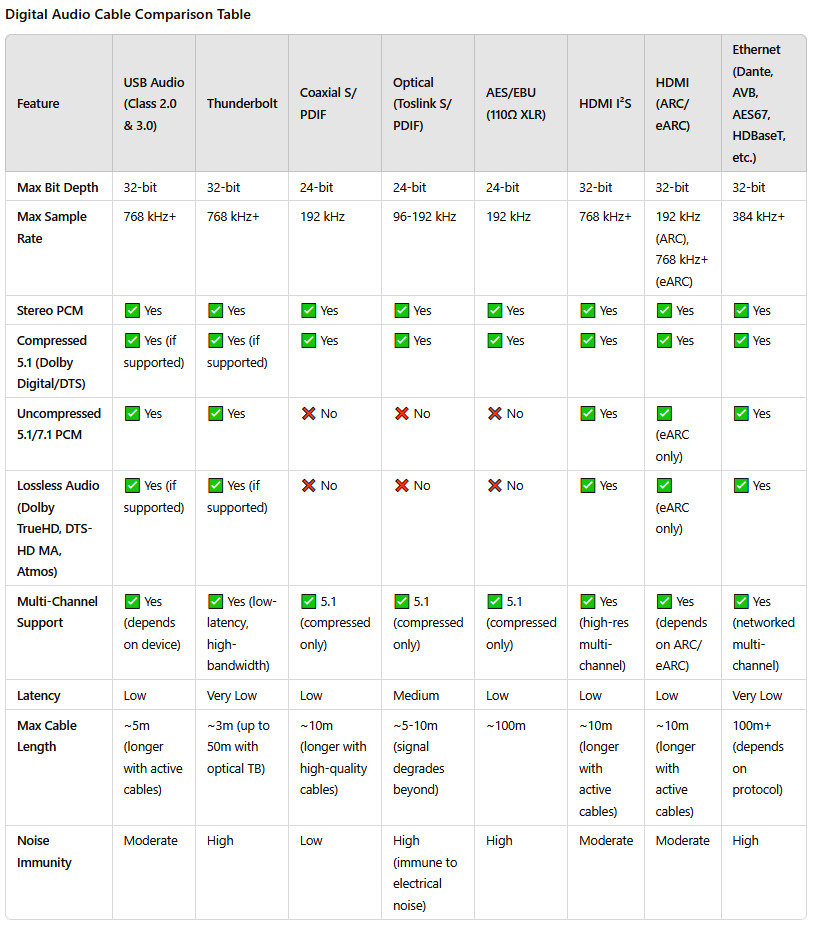
Here is a handy reference table, for you:
FutureShop stocks digital audio cables across all connection types covered in this guide, from digital coaxial and USB to AES/EBU and audiophile Ethernet. Not sure which connection is right for your system? Get in touch with our team for free expert advice.