FutureShop stocks a curated range of HDMI cables from specialist brands including AudioQuest, Wireworld, Nordost, Chord Company, and Supra. Our team advises on HDMI selection daily, from simple 4K TV setups to complex custom installations.
Our Verdict
For most home theatre and gaming setups, a certified 48G HDMI 2.1 cable from a reputable brand is the right long-term choice. For runs under 3m, copper cables from brands like AudioQuest or Wireworld offer the best combination of performance and value. For longer runs, move to fibre optic HDMI.
Quick Take
- HDMI 2.1 is a hardware specification; 48G is the bandwidth. Both your device and your cable need to support 48G for demanding content like 4K at 120Hz or 8K at 60Hz.
- 18G (HDMI 2.0) cables handle uncompressed 4K at 60Hz and are still perfectly adequate for standard Blu-ray players and most streaming devices.
- Cable length is critical: keep copper HDMI cables under 3m for full 48G bandwidth. Runs beyond 7m require fibre optic or active HDMI. For very long installations, use HDBaseT extenders.
- eARC (37 Mbps) supports uncompressed Dolby Atmos and DTS:X. ARC (1 Mbps) supports only compressed formats. If your soundbar or AV receiver supports eARC, use a 48G cable on that port.
- High-end HDMI cables are often directional: fibre optic and active cables must run towards the display. Check the cable markings before installation.
- Look for cables certified as "Ultra High Speed" (48G) or "Premium High Speed" (18G) with the official HDMI logo. These have been independently tested and verified.
Understanding Everything Today's HDMI Cables Can Deliver
If you pinned 65 inches of light-emitting diodes to the living room wall, would you not want all 8.3 million diodes clear and bright? A good HDMI cable will do just that.
If you've ever connected your TV to a streaming device, gaming console, or Blu-ray player, chances are you've used an HDMI cable. But what exactly is an HDMI cable, and why is it important? This easy-to-understand guide covers everything you need to know about HDMI cables, ensuring you're well-informed when choosing the right one.
What is an HDMI Cable? – Understanding the Basics
HDMI (High-Definition Multimedia Interface) is a single cable solution that carries high-definition video and high-resolution audio between devices. HDMI cables commonly connect devices like:
• Televisions and projectors
• Computers and monitors
• Gaming consoles (PlayStation, Xbox, Nintendo Switch)
• Streaming devices (Roku, Apple TV, Amazon Fire Stick)
• Blu-ray and DVD players
• Soundbars and home theatre systems
• High-end audio (using I2S)
Why is an HDMI Cable Important? – How It Affects Your Viewing Experience
HDMI cables provide high-definition video and audio in a single cable, making your setup simpler and clutter-free. They support formats, including 4K, 8K, and 3D video. For audio, they can handle surround sound formats like Dolby Atmos and DTS:X.
Types of HDMI Cables Explained – Which One Do You Need?
Not all HDMI cables are created equal. Technology moves fast and cables need to play catch up. The latest cables can handle more information than your TV can. Older spec cables may still work for you but with content demands growing, you're likely to trip up on those old cords.
Terms like '48G' and 'v2.1' are thrown around to promote the latest spec cables but how significant are they? Let's attempt to untwist this tangle of terminology.
HDMI 2.0 vs HDMI 2.1: What's the Difference? – Key Features Compared
HDMI 2.1 is a specification. It is the hardware's specification required to transfer high bandwidths of audio/video data.
48G (48 Gigabits per second) is the bandwidth. It is the bandwidth required for demanding content like high resolution, high frame rate, Dynamic HDR and eARC, etc.
Your hardware needs to be specified as HDMI 2.1 to support the 48G high bandwidth content, but it is the cables that must be able to carry all the data.
• 48G cables can carry: uncompressed 4K resolutions at 120Hz, 8K at 60Hz, compressed 10K at 60Hz, HDR10+, Dynamic HDR, Dolby Vision, eARC and everything below.
• 18G cables can carry: uncompressed 4K at 60Hz, HDR10, Dolby Vision, ARC and everything below.
A typical Blu-ray player is HDMI 2.0 as most Blu-ray content can be delivered within the bandwidth capabilities of that standard. HDMI 2.1 is typically unnecessary for a standard Blu-ray player.
Do You Need a 48G HDMI Cable? – Choosing the Right Bandwidth
You only need 48G cables for next-gen gaming consoles or future-proofing setups that immerse you in the ultimate resolution and astonishingly smooth frame rates such as:
• Modern sound systems that support Dolby Atmos may require an HDMI 2.1 port that works with eARC
• Newer games consoles: PlayStation 5, Xbox Series X, Xbox Series S
However, the high-performance, high-priced cables you buy are naturally marketed with the latest, 48G capability. The quality of audio and video relates to the quality of cable design – regardless of specifications.
How to Choose the Right HDMI Cable – 4 Factors to Consider
Do expensive HDMI cables matter? When choosing an HDMI cable, consider the following factors:
1. Cable Length – Does Size Really Matter?
At long lengths, HDMI gets rather flaky. Anything longer than 7m should be Fibre Optic/copper hybrid (for full bandwidth content – 4K 120Hz – use less than 3m). Premium cable maker, AudioQuest, boasts 5m 4K 60Hz content.
For installations over very long distances, one should use HDBaseT systems. These use transmitters and receivers that change HDMI into Ethernet and back to HDMI.
2. HDMI Specifications – Matching the Cable to Your Devices
HDMI 2.1 vs HDMI 2.0. Make sure the cable supports the resolution and refresh rate you need. For instance, if you have a 4K TV and a gaming console that supports 4K at 60Hz, go for a Premium High-Speed HDMI cable at least 48G. Below is a comparison between HDMI 2.0 and 2.1 capabilities.
Speed & Performance
• HDMI 2.0: 18 Gbps
• HDMI 2.1: 48 Gbps (more data, smoother performance)
Resolution & Refresh Rate
• HDMI 2.0: 4K at 60Hz
• HDMI 2.1: 4K at 120Hz, 8K at 60Hz
Colour & HDR
• HDMI 2.0: Basic HDR
• HDMI 2.1: Dynamic HDR (better contrast and colours)
Audio Quality
• HDMI 2.0: ARC (standard audio)
• HDMI 2.1: eARC (supports Dolby Atmos, richer sound)
Bottom Line: HDMI 2.1 is faster, smoother, and delivers better visuals and audio. If you're into high-quality gaming or home theatre, it's the better choice.
3. Build Quality – What to Look for in a Durable HDMI Cable
Look for cables with durable connectors, braided jackets, and gold-plated tips for better longevity and signal quality.
The cables we recommend to customers are built to high standards and designed for longevity.
4. Certification & Performance – Ensuring High-Quality Transmission
Certified HDMI cables have been tested to meet performance standards. Look for cables with the HDMI logo and proper certification labels such as 'Ultra High Speed' or 'Premium High Speed'.
Which HDMI Cable Should I Buy? A Practical Guide by Use Case
The four factors above tell you what to look for. This table translates that into specific buying guidance, covering the most common setups we see at FutureShop, from everyday streaming to reference home cinema.
| Your setup | Spec needed | Max recommended length (copper) | Suggested starting point |
|---|---|---|---|
| Streaming device or Blu-ray player to 4K TV | 18G (HDMI 2.0) | 5m | AudioQuest Pearl 48G (from £34.95). A 48G cable future-proofs even a 4K/60Hz source. |
| PS5 or Xbox Series X gaming at 4K/120Hz | 48G (HDMI 2.1). Cable and TV port must both be 2.1. | 3m for full 4K/120Hz | Wireworld Sphere 48 (from £69.95) or AudioQuest Cinnamon 48G (from £119.95). |
| Home theatre with eARC soundbar or AV receiver | 48G on the eARC port. 18G acceptable on other ports. | 3m on the eARC connection | Wireworld Radius 48 (from £40.95) on the eARC port. Budget 48G on remaining ports. |
| Wall installation or run over 5m | 48G fibre optic HDMI. Directional: source end to display end. | Up to 50m+ depending on cable | Fibre optic HDMI. Test before installing in a wall. Install in conduit for future upgrades. |
| Multi-room or very long installation (10m+) | HDBaseT extender system (HDMI to Ethernet and back) | Up to 100m over Cat6 | Speak to our team for system-specific advice. HDBaseT is the professional standard for long-distance HDMI distribution. |
| High-end audiophile or home cinema reference system | 48G with premium construction: silver conductors, low-noise geometry, superior shielding | Up to 3m (copper); longer with fibre optic variants | AudioQuest Cinnamon 48G or higher. The quality of cable design matters at this level. Ask our team for a matched recommendation. |
ARC vs eARC: What's the Difference? – Better Sound for Your Home Theatre
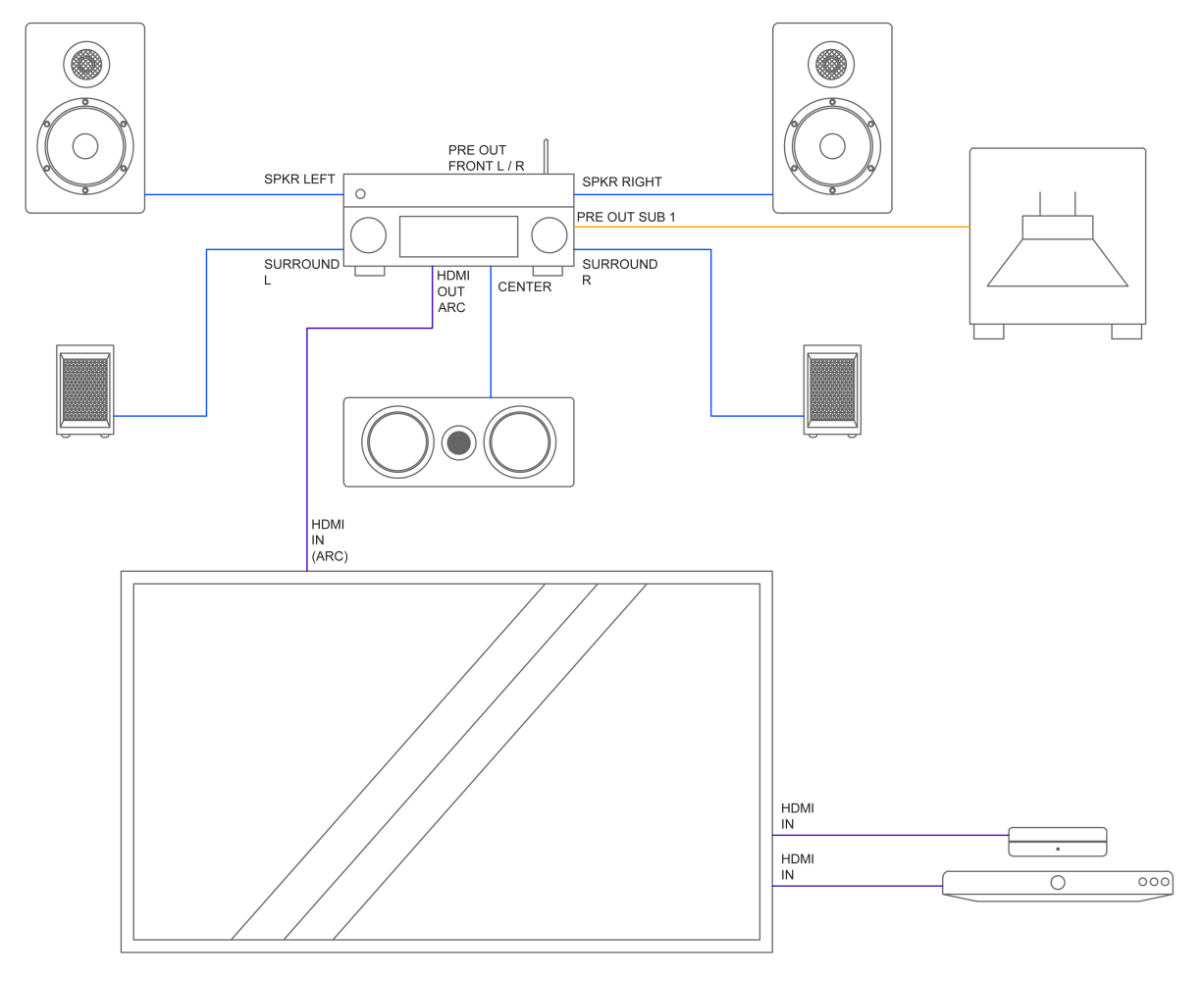
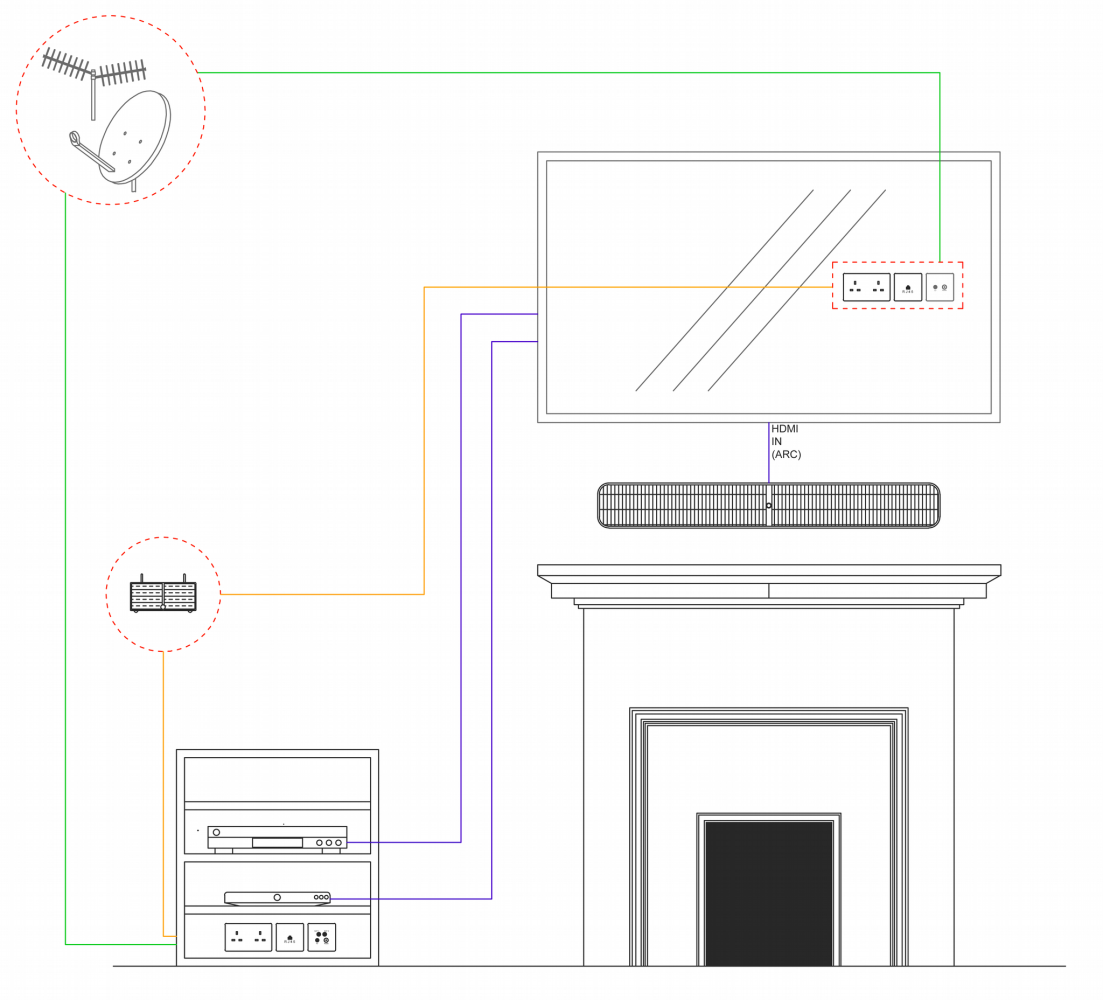
Less understood but handy features of HDMI cables are ARC (Audio Return Channel) and eARC (Enhanced Audio Return Channel). These features allow your TV to send audio back to an eARC compatible soundbar or AV receiver without using an extra audio cable.
ARC (Audio Return Channel)
• Introduced with HDMI 1.4: Enables your TV to send audio to external audio systems.
• Reduces cable clutter: Eliminates the need for a separate optical audio cable.
• Supports basic audio formats, Such as Dolby Digital and DTS.
• Ideal for: Simple soundbar setups and basic surround sound systems.
eARC (Enhanced Audio Return Channel)
• Introduced with HDMI 2.1: Offers improved bandwidth and speed compared to ARC.
• Supports advanced audio formats: Like Dolby Atmos, DTS:X, and uncompressed 5.1 and 7.1 surround sound.
• Automatic device detection: Simplifies setup and ensures the best possible audio quality.
• Ideal for: High-end home theatre systems and next-gen audio setups.
Why Choose eARC Over ARC?
If you're setting up a modern home theatre or using advanced audio formats, eARC provides significantly better sound quality. For basic setups, ARC is still a convenient and effective solution.
ARC Bandwidth: Around 1 Mbps
eARC Bandwidth: Approximately 37 Mbps
Common HDMI Cable Myths Demystified – Separating Fact from Fiction
Myth 1: Expensive HDMI Cables Are Always Better
Truth: A higher price doesn't always mean better performance. If the cable meets the required specifications, even budget-friendly options work just as well.
Truth: A well-designed cable with high-quality conductors and noise dissipation on suitable components can greatly enhance the standard of your audio and video content. Speak to our trained advisors for the best possible advice.
Myth 2: All HDMI Cables Are the Same
Truth: Different cables support different resolutions and features. Choose one that matches your device's capabilities.
Myth 3: Longer Cables Always Lose Signal Quality
Truth: While very long cables can lose signal, using fibre optic or active HDMI cables can prevent these issues.
Tips for Installing & Using HDMI Cables – Avoiding Common Pitfalls
• Directionality: High-end HDMI cables are often directional. Long fibre optic and active cables must run towards the display device. With eARC, the cable still runs towards the display.
• Test, test, test: If you are installing an HDMI cable, test its connection before burying it in the wall and avoid an expensive mistake.
• Avoid sharp bends: Bending the cable sharply can damage the internal wiring.
• Secure connections: Make sure cables are firmly plugged in to avoid signal interruptions.
• Label your cables: If you have multiple HDMI cables, labelling them can save time when troubleshooting.
• Upgrade when necessary: Futureproof and install the latest specifications. If you upgrade your devices, check if you need a new HDMI cable to support new features like 4K or HDR.
• Protect your cables: Install your cable in conduit if possible. This makes it easier to backtrack or upgrade later. While work is done, cover the connectors to avoid dust ingress.
Conclusion: Choosing the Best HDMI Cable for Your Setup
HDMI cables are essential for modern entertainment systems, offering a simple solution for high-quality audio and video connections. By understanding the different types and what to consider when buying one, you can ensure the best performance for your devices. Remember, you don't need to spend a fortune—just choose a cable that suits your needs and is properly certified.
Ready to upgrade your home entertainment setup? Choose the right HDMI cable today!
If you want to go deeper on how HDMI fits into a wider digital audio setup, our essential guide to digital audio interconnects covers every connection type from coaxial S/PDIF to USB and AES/EBU. And for a practical look at AudioQuest HDMI cables in use, our AudioQuest review covers their HDMI range alongside noise stoppers and signal conditioning accessories.
Browse the full range of HDMI cables at FutureShop, including AudioQuest, Wireworld, and fibre optic HDMI, all backed by our 60-day money-back guarantee on cables. Not sure which cable is right for your system? Get in touch with our team for free expert advice.